Add it, or take it out
Four clicks in Steam, then paste. If you already use launch options, paste your line and get it back with the option in it once — or taken out — without touching the rest.
- 01Libraryin the Steam client
- 02Right-click WARDOGSin the game list
- 03Properties…then the General tab
- 04Launch Optionsthe text box at the bottom
-nogpucrashdebuggingPaste it back into the Launch Options box. Nothing you type leaves this page.
What it is: a launch option, not an error
Nothing in WARDOGS displays “nogpucrashdebugging”. It is text a player types into Steam’s Launch Options box, which Steam passes to the game every time it starts. WARDOGS runs on Unreal Engine 5, and in that engine GPU crash debugging is a documented feature: Epic’s documentation says NVIDIA Nsight Aftermath can be turned on with the console variable r.GPUCrashDebugging=1, or “by passing it as a command line argument: -gpucrashdebugging”. Epic describes Aftermath as light enough that “it can even ship with finished games” to collect crash data from players’ machines. The “no” form players use is the opposite switch by its name; Epic’s page does not document it, and BULKHEAD has not said whether WARDOGS turns crash debugging on by default.
What Intel says, for the Arc B580
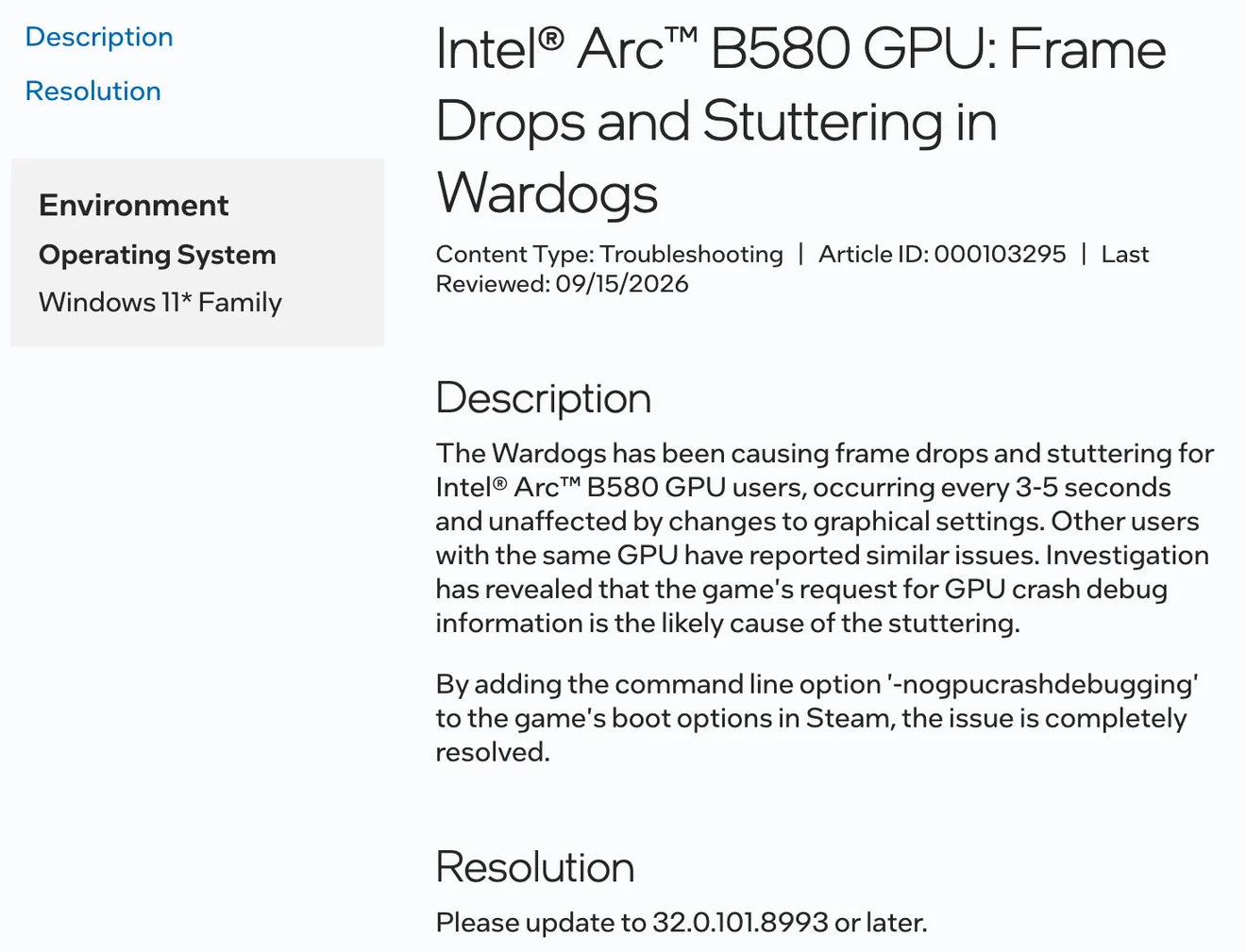
Intel’s support article 000103295, last reviewed 15 September 2026, is about one card. It says WARDOGS caused frame drops and stuttering for Arc B580 users “occurring every 3-5 seconds and unaffected by changes to graphical settings”, that “the game's request for GPU crash debug information is the likely cause of the stuttering”, and that adding the option to the game’s boot options in Steam “completely resolved” it. Its listed resolution is not the option but a driver: “Please update to 32.0.101.8993 or later.” So on an Arc B580 the first step is the driver; the option is the workaround Intel describes. The article says nothing about NVIDIA or AMD cards.
The “Outdated Graphics Driver” warning and the minimum versions players report →
What players report on other cards
Everything else is player accounts on the Steam board, and they split. Some describe large frame-rate gains, one says it stopped hourly crashes, others notice nothing. Nobody posts a benchmark, names a build, or says what else changed between runs — a driver, a patch, a setting — so treat these as reasons to try it, not as measurements.
- The crash claim is one player’s. It is the opposite of what the option’s name says it does — it turns crash debugging off, it does not fix crashes — and no other source connects the two.
- The option often travels inside a longer string, such as “-dx12 -high -USEALLAVAILABLECORES -nogpucrashdebugging -xgeshadercompile -nothreadtimeout -NoVerifyGC -gc.Interval=60” (11 October). This page covers one option only. Answering that string in another thread, a player wrote that “The dx12 flag is useless as the game is DX12 only”.
| When (UTC) | What the player says | Thread |
|---|---|---|
| 1 Oct 2026, 01:01 | “FPS issue fixed with this command: -nogpucrashdebugging I went from around 90 FPS to 170 FPS” | 23GB RAM usage when 16GB is recommended?! |
| 2 Oct 2026, 15:35 | Depending on the GPU it “can either drastically improve performance or make no difference at all” | 23GB RAM usage when 16GB is recommended?! |
| 3 Oct 2026, 15:22 | “it got me another 30FPS” | The game needs more fps |
| 4 Oct 2026 | “had this in my launch options for a week and didn't notice any difference in frames” | USE THIS FOR BETTER FRAMES IN YOUR LAUNCH OPTIONS |
| 7 Oct 2026, 23:58 | “Type this in launch option -nogpucrashdebugging it will help you” | Massive FPS drops recently |
| 12 Oct 2026, 13:22 | “The game used to crash every hour. I entered this command, and haven't had a single crash since” | Persistent crashing after about 10 mins of playing |
| 17 Oct 2026, 06:08 | “This command helped me. Add it to the launch options.” — after Season 02 | compiling shaders |
How to add it, and how to take it out
The path players give is Steam’s standard one. Steam saves the box per game, so the option stays until you delete it, and it does nothing outside WARDOGS. If the box already holds other options, put a space between them. To undo it, delete the text and close the window — or use the line builder at the top of this page, which keeps the rest of your line intact.
- 01
Open your Steam Library
In the Steam client, not the store page.
- 02
Right-click WARDOGS → Properties…
The General tab opens first.
- 03
Find Launch Options
The text box at the bottom of the General tab.
- 04
Type -nogpucrashdebugging
With the leading hyphen, no quotes. Close the window; Steam saves it.
- 05
Start the game normally
Steam passes the option on every launch until you remove it.
What it may cost you
If the option does what its name says, the game collects less information when the graphics card crashes. That matters to the studio more than to you: BULKHEAD’s Season 1 notes say GPU crash reports now carry more detail so the team can act on them faster. No source says whether the option changes what WARDOGS’ crash report contains, and nothing suggests it is against the rules — it is a standard Steam setting, not third-party software. If you are reporting a GPU crash to BULKHEAD, saying whether the option was on is useful context.
What BULKHEAD has fixed and what is still reported about crashes →
What is not established
No source checked for this page — Intel’s, Epic’s and BULKHEAD’s included — publishes the following:
- What the option does on NVIDIA and AMD cards, measured on a named build.
- Whether WARDOGS turns GPU crash debugging on by default, and on which cards.
- Whether the option changes what a WARDOGS crash report contains.
- Whether driver 32.0.101.8993 alone fixes the Arc B580 stutter without the option.
- Whether BULKHEAD considers it safe, unnecessary or harmful. The studio has not mentioned it.
Common questions
What does -nogpucrashdebugging do in WARDOGS?
By its name it stops the game collecting GPU crash debug information. Intel says that collection is the likely cause of stutter every 3–5 seconds on its Arc B580, and that the option resolved it. Epic documents the opposite switch, -gpucrashdebugging, which turns GPU crash debugging on in Unreal Engine. BULKHEAD has published nothing about it.
Does -nogpucrashdebugging improve WARDOGS performance?
On an Intel Arc B580, Intel’s own support article says it resolved the stutter, and lists driver 32.0.101.8993 or later as the fix. On other cards there are only player reports, and they split: some describe 30 to 80 more frames per second, others no difference. This site has not measured it.
How do I add -nogpucrashdebugging to WARDOGS?
In your Steam Library, right-click WARDOGS, choose Properties, and type -nogpucrashdebugging into Launch Options at the bottom of the General tab. If other options are already there, separate them with a space.
How do I remove -nogpucrashdebugging?
Open the same Launch Options box and delete it, keeping anything else you want. Steam saves the change when you close the window.
Can you get banned for -nogpucrashdebugging?
Nothing suggests so. It is a standard Steam launch option, not third-party software, and no BULKHEAD or Team17 source mentions it either way.
Does -nogpucrashdebugging fix WARDOGS crashes?
Not by its design — it turns crash debugging off, it does not repair what crashes. One player says hourly crashes stopped after adding it; no other source supports that.
Is “no GPU crash debugging” the same as -nogpucrashdebugging?
Yes. Players often search it with spaces, but the option itself is one word with a leading dash: -nogpucrashdebugging, exactly as Intel and every player report write it. Enter it that way in Launch Options, not as separate words.
Sources & verification
Intel’s support article 000103295 is a hardware vendor writing about its own GPU, read in full on 17 October 2026. Epic’s Unreal Engine documentation is cited for what GPU crash debugging is in the engine WARDOGS runs on. Every frame-rate figure is a player’s claim on the Steam board, quoted from the raw thread text with its UTC time. Neither BULKHEAD nor Team17 has published anything about the option, and this site has not measured it.
| Source | Type | Read |
|---|---|---|
| Intel Support · “Intel® Arc™ B580 GPU: Frame Drops and Stuttering in Wardogs”, article 000103295, last reviewed 15 September 2026Intel's own troubleshooting article, about its own GPU — a hardware vendor, not BULKHEAD or Team17. Re-read 2026-10-17 in a browser (the article refuses plain HTTP clients): stutter every 3-5 seconds regardless of graphics settings; the game's request for GPU crash debug information is the likely cause; adding -nogpucrashdebugging to the game's boot options in Steam completely resolved it; resolution: driver 32.0.101.8993 or later. Scoped to the Arc B580 on Windows 11. | Publisher stated | 2026-10-17 |
| Epic Games · “NVIDIA Nsight Aftermath for GPU Pipeline Debugging in Unreal Engine”Epic's engine documentation, not a WARDOGS source. Cited for what GPU crash debugging is in Unreal Engine: enabled with r.GPUCrashDebugging=1 or the -gpucrashdebugging command-line argument, and light enough to ship in finished games. The page does not mention -nogpucrashdebugging. | Publisher stated | 2026-10-17 |
| BULKHEAD · Pre-Load Live & Season 1 Changelog, 9 September 2026Published 22:46:09 UTC. Records server-browser, voice, stability, progression and economy changes from beta to Season 1. | Publisher stated | 2026-09-11 |
| Steam · “23GB RAM usage when 16GB is recommended?!”, WARDOGS discussions, opened 15 September 2026Cited for two replies: 2026-10-01 01:01 UTC, “FPS issue fixed with this command: -nogpucrashdebugging I went from around 90 FPS to 170 FPS”; and 2026-10-02 15:35 UTC, giving the Properties → General → Launch Options path and saying it “can either drastically improve performance or make no difference at all” depending on the GPU. | Unverified | 2026-10-06 |
| Steam · “The game needs more fps”, WARDOGS discussions, 3 October 2026Cited for one reply at 2026-10-03 15:22 UTC: “try the '-nogpucrashdebugging' thing in the steam launch preferences for this game, it got me another 30FPS”. | Unverified | 2026-10-06 |
| Steam · “USE THIS FOR BETTER FRAMES IN YOUR LAUNCH OPTIONS”, WARDOGS discussions, 4 October 2026Opened 2026-10-04 15:25 UTC with the option alone. A reply two minutes later: “I had this in my launch options for a week and didn't notice any difference in frames”; the opener answered on 5 October that it got them “an extra like 50 frames”. | Unverified | 2026-10-06 |
| Steam · “Massive FPS drops recently”, WARDOGS discussions, 7 October 2026Opened 2026-10-07 22:33 UTC. Cited for one reply at 23:58 UTC: “Type this in launch option -nogpucrashdebugging it will help you”. No figures. | Unverified | 2026-10-17 |
| Steam · “Persistent crashing after about 10 mins of playing”, WARDOGS discussions, 10 October 2026Opened 2026-10-10 22:32 UTC. Cited for a reply at 2026-10-11 03:03 UTC posting the long launch-option string quoted on this page, and one at 2026-10-12 13:22 UTC: “The game used to crash every hour. I entered this command, and haven't had a single crash since (-nogpucrashdebugging)”. One player's account. | Unverified | 2026-10-17 |
| Steam · “MEMORY”, WARDOGS discussions, 11 October 2026Cited for a reply at 2026-10-12 06:11 UTC answering the same long string: “The dx12 flag is useless as the game is DX12 only”. A player's statement. | Unverified | 2026-10-17 |
| Steam · “compiling shaders”, WARDOGS discussions, 16 October 2026Opened 2026-10-16 18:53 UTC, the day after Season 02 went live. Cited for a reply at 2026-10-17 06:08 UTC: “-nogpucrashdebugging This command helped me. Add it to the launch options.” No figures. | Unverified | 2026-10-17 |