What did BULKHEAD say your target needs?
The store page lists parts and buries the result. Turned around, it answers by what you are aiming for — and it puts the word most requirement tables drop back in front of you: upscaled.
Pick what you are aiming for. The store page is organised by parts; this turns it around and answers by target, including the cases where the honest answer is that BULKHEAD published nothing.
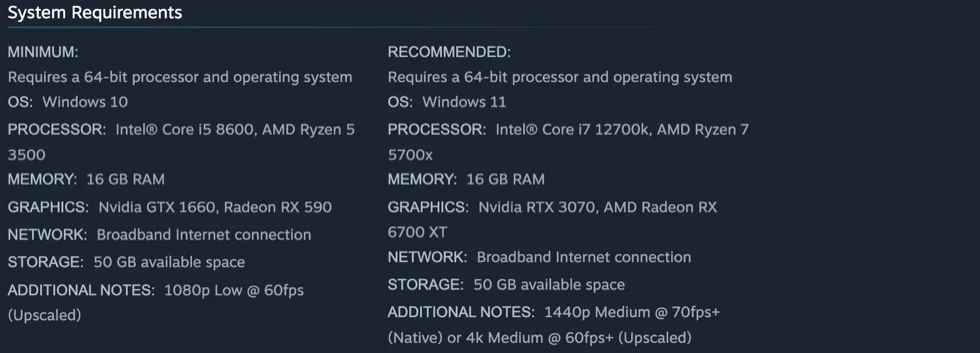
1440p Medium @ 70fps+ (Native)
Recommended tier · Native
- GPU
- RTX 3070 / Radeon RX 6700 XT
- CPU
- Core i7-12700K / Ryzen 7 5700X
- RAM
- 16 GB — identical at both tiers
The only native figure BULKHEAD published, and the only one with a “+” on it. Medium rather than High, and 70fps rather than a round 60 — both are the studio's own numbers and both are worth noticing, because a recommended tier that names Medium is telling you where its own headroom ends.
What no published figure covers
- Frame pacing in a full 100-player fight, which is the case that matters and the one a requirements box never describes
- What the destruction and building systems cost when a town actually comes down
- VRAM headroom at 1440p, with no VRAM figure published at either tier
- CPU load with 100 players and proximity voice running together
Every figure above is quoted from BULKHEAD’s own Steam requirements box, read 13 September 2026. Nothing here is a benchmark — this site has not measured the game, and says so rather than dressing the studio’s targets up as results.
The number the store page buries
Most requirement boxes tell you what to own and go quiet about what you get. BULKHEAD published both, in a row labelled ADDITIONAL NOTES that almost nobody quotes: the minimum tier targets 1080p Low at 60fps **upscaled**, and the recommended tier targets 1440p Medium above 70fps **native**, or 4K Medium above 60fps upscaled. That bracketed word is the whole story of the minimum tier. A GTX 1660 is not being promised native 1080p60 — it is being promised 60fps at the lowest preset while rendering fewer pixels than your monitor displays.
What Season 1 actually changed in the settings menu
This is the part with real answers, because patch notes are the one place a studio has to be specific. DLSS Frame Generation can now be switched off without restarting the game, which is the fix for the most-asked frame-generation question. The render-target pool became configurable. Shadow-cache refreshes were made less frequent to address hitching when taking control of a character, and a high benchmark score now clamps shadow quality to Low rather than disabling shadows outright — so if your shadows vanished, that is a named behaviour that changed rather than a bug in your setup.
The full Season 1 performance list →
- DLSS Frame Generation toggles without a restart
- Two Frame Generation crash paths fixed; GPU crash reports gained detail
- Shadow-cache refreshes reduced, targeting control-transition hitching
- A high benchmark score clamps shadows to Low instead of disabling them
- Startup failures got clearer messages and recovery handling
Patch 0.11 says more GPU crashes, and names none of them
The 12 September announcement states that more GPU crashes are addressed. It does not name affected hardware, drivers or individual crash paths, so it is a published fix claim rather than evidence that any particular crash is resolved. Worth taking the update; not worth reading as a promise about your card.
Why this page has no preset
Search for WARDOGS settings and you will find a dozen videos with a confident list of sliders. Some of that is probably good. None of it is checkable: no BULKHEAD recommendation exists to measure it against, the game has had three performance patches in its first four days, and a preset recorded on the launch build is describing software that has already changed twice. Publishing a list here would be adding one more unverifiable set of sliders to a pile of them, dressed in this site's typeface. What is publishable is what changed and what the studio targets — which is above.
If you searched for the “FPS show”, you probably want the broadcast
A genuine ambiguity, and one that sends people to the wrong page. The FPS Games Show is a showcase BULKHEAD created and streamed on 3 September, with sixteen shooters on the bill — so `wardogs fps show`, `fps showcase wardogs` and `wardogs fps show länge` are asking about an event and its running time, not about frame rate. If that is what brought you here, this is not the page. If you actually meant frames per second, it is.
The settings question with a bug behind it
One phrasing recurs often enough to be worth naming rather than filing under “settings”: players reporting they cannot get past the audio settings screen. That is a navigation failure in a menu, not a graphics-tuning question, and no official source addresses it. It is recorded here as reported, with no remedy attached, because the alternative is inventing one.
Flight controls are a different page
A large share of the settings searches are about helicopters — HOTAS bindings, flight assist, sensitivity, and people trying to make the handling feel like another game they already fly in. Those belong with the controls rather than with graphics, and there is a page for them.
What would have to be measured
Naming it is the honest alternative to guessing at it. A useful performance page for this game would report frame pacing in a full 100-player fight rather than an average in an empty lobby; the cost of the destruction and building systems when a town comes down; VRAM headroom at 1440p, which no published tier states at all; and CPU load with 100 players and proximity voice running together. Those are measurable against a named build, with the method shown, and that is the bar this site holds itself to before printing a number.
If it is not stuttering but closing, that is the other page
Worth separating, because the two get searched with the same words. This page is about frame rate and what the studio’s tiers target. A process that disappears, or a machine that locks up entirely, is a different failure with its own published record — Season 1 names six individual crash fixes, and the reports that outlived them are collected separately.
Lag when you open the inventory or a vendor
One lag report has repeated since the first week, and it is specific enough to name. The game runs smoothly in the field, then stutters or stops for a moment when the inventory, the shop or a vendor opens: from a short hitch to “like 5 seconds”. Of the six dated reports located, four name an upscaler, three FSR and one DLSS, and in the DLSS report turning DLSS off made the lag disappear. The workarounds players describe come down to changing the upscaler. One player moved to XeSS Ultra Quality Plus and reports no lag at all. Another enabled FSR in AMD Adrenalin as well as in game and was left with a stutter of about a tenth of a second. None of the six patch notes this site records, from Season 1 to the 2 October hotfixes, mentions it. The Season 1 shadow-cache change targeted a different hitch, the one when you take control of a character. These are players describing their own machines, not measurements, so the table is a pattern worth testing rather than a fix.
| Reported (UTC) | Upscaler named | What the player describes |
|---|---|---|
| 11 Sep 2026 | None | Massive stutters in the shop and inventory only; normal gameplay smooth |
| 20 Sep 2026 | AMD FSR | Lag whenever the inventory or a trader opens |
| 22 Sep 2026 | AMD FSR | FSR also enabled in AMD Adrenalin: about a 0.1-second stutter left |
| 29 Sep 2026 | DLSS | Lags opening the inventory or a merchant; gone with DLSS off |
| 2 Oct 2026 | None | Gear and magazine-repack menus halt the game for about 5 seconds |
| 4 Oct 2026 | FSR, any setting | Stutter on every inventory open; XeSS Ultra Quality Plus does not lag |
Common questions
What are the best settings for WARDOGS?
BULKHEAD has not published a recommended preset, and this site has not benchmarked the game, so there is no honest answer to copy. What is published is what each hardware tier targets — 1080p Low at 60fps upscaled, or 1440p Medium above 70fps native — and which specific settings the Season 1 and Patch 0.11 updates changed.
How do I turn on Frame Generation in WARDOGS?
The game exposes DLSS Frame Generation, and since the Season 1 patch it can be switched off without restarting — which is the change most of the frame-generation questions are actually about. BULKHEAD has not published a recommended configuration for it.
Why is WARDOGS stuttering?
One named cause has an official fix: Season 1 reduced shadow-cache refreshes specifically to address hitching when taking control of a character. Anything beyond that is unestablished — no source we can check has published a general cause, and this page will not guess at one.
What FPS should I expect in WARDOGS?
On the minimum tier, 60fps at 1080p Low with upscaling. On the recommended tier, above 70fps at 1440p Medium natively, or above 60fps at 4K Medium upscaled. Those are BULKHEAD's own published targets, not measured results, and there is no published tier above Recommended — so no official answer exists for a 120fps or 144Hz target.
Why did my shadows disappear in WARDOGS?
Season 1 changed this deliberately: a high benchmark score now clamps shadow quality to Low instead of disabling shadows. If shadows came back at a lower quality after an update, that is the published behaviour rather than a fault.
What is the WARDOGS FPS show?
The FPS Games Show — a showcase BULKHEAD created and streamed on 3 September 2026 with sixteen shooters on the bill. It is an event, not a frame-rate counter, and it is a common reason people land on a performance page by mistake.
Why does WARDOGS lag when I open my inventory?
BULKHEAD has not said. Players have reported it since 11 September, and most of the dated reports tie it to the upscaler: FSR in three, DLSS in one, where turning DLSS off removed the lag. One player reports XeSS Ultra Quality Plus with no lag at all. Another reports that enabling FSR in AMD Adrenalin as well as in game left only a tenth-of-a-second stutter. No patch note recorded here mentions the problem.
Sources & verification
Every figure is BULKHEAD's own, read from the Steam requirements box and the Season 1 and Patch 0.11 notes on 13 September 2026. This site has not measured frame rates and does not present the studio's targets as results.
| Source | Type | Read |
|---|---|---|
| Steam · WARDOGS official store listing | Publisher stated | 2026-09-11 |
| BULKHEAD · Pre-Load Live & Season 1 Changelog, 9 September 2026Published 22:46:09 UTC. Records server-browser, voice, stability, progression and economy changes from beta to Season 1. | Publisher stated | 2026-09-11 |
| BULKHEAD · Scheduled Maintenance & Patch 0.11, 12 September 2026Published 22:26:39 UTC. Schedules approximately one hour of maintenance from 08:00 UTC on 14 September and details server-browser, community-server, crash, capacity and economy-enforcement changes. Planned features are explicitly not part of this patch. | Publisher stated | 2026-09-14 |
| Steam · WARDOGS developer announcements | Publisher stated | 2026-09-11 |
| Steam · “Massive Stuttering/Lag in Shop and Inventory”, WARDOGS discussions, 11 September 2026Opened 20:23 UTC: “whenever I open the shop or my inventory, I get massive stutters and lag… This only happens in the shop and inventory — normal gameplay runs perfectly fine.” A 22 September reply says enabling FSR upscaling in AMD Adrenalin as well as in game “works nicely”, leaving “like a 0.1 second stutter”. Player reports; no developer reply in the thread. | Unverified | 2026-10-10 |
| Steam · “Amd Fsr lag spike”, WARDOGS discussions, 20 September 2026Opened 13:42 UTC, the whole post: “When you turn on amd fsr, you lag when you open the inventory or trader.” Cited for tying the inventory lag to FSR in one sentence, nine days after the first report. | Unverified | 2026-10-10 |
| Steam · “kicks me back to the main menu and stutters TAB”, WARDOGS Report a Problem, 29 September 2026Opened 09:39 UTC: “with DLSS enabled, the game lags terribly whenever I open my inventory or shop with a merchant. If I turn off DLSS, the lag disappears”. The only located report naming DLSS rather than FSR; the same player reports a separate kick-to-menu problem, which is not what this source is cited for. | Unverified | 2026-10-10 |
| Steam · “Inventory and vendor menu stutter”, WARDOGS Report a Problem, 2 October 2026Opened 10:22 UTC: menus to purchase gear or repack magazines make the game “come to a halt for like 5 seconds then goes back to normal”. Names no upscaler; cited for the symptom persisting after Update 0.1.2. | Unverified | 2026-10-10 |
| Steam · “FSR cause stutter when u open inventory”, WARDOGS Report a Problem, 4 October 2026Opened 20:00 UTC on a Ryzen 7 7800X3D and RX 6900 XT: “If i use FSR with any settings, it will cause stutter anytime i open inventory.” The player switched to XeSS Ultra Quality Plus, which “doesnt lag at all”. One player's machine; no reply when read. | Unverified | 2026-10-10 |